
Pika
AI creative video platformIdeas in, video out
Highlights
What you can do with it
- Turn a written travel piece into a promotional travel video
- Upload a product sketch and get a short feature showcase
- Supply a wedding theme and music and get a wedding video
How to use it
- 1 Open the Pika site and start a project
- 2 Enter your idea as text, a sketch, or an audio clip
- 3 Pick a template or effect if you want one
- 4 Let it generate the video, then edit the result
- 5 Publish or download the finished clip
Who it is for
Pros
- Free trial available to test the output
- Takes several input types including sketches and audio
- Editing and publishing sit in the same tool
Limitations
- Free trial limits mean longer or more frequent projects need a paid plan
- Generated video quality varies with the idea and the effect used
- The site was not responding when this entry was checked, so access may vary
What Pika is
Pika is an AI video production platform built around a simple exchange: you give it a creative idea, it gives you a video. The idea can arrive as text, a sketch, or an audio clip, and the platform turns it into a finished clip with effects applied. It includes several video templates and special effects, and it keeps editing and publishing in the same place so you do not need a separate editor for simple work. It runs on a free trial model and is aimed at creatives and video enthusiasts rather than professional studios.
What you can do with it
- Enter an idea as text, a sketch, or audio
- Generate a video automatically from that idea
- Apply templates and special effects from the built in library
- Edit the generated clip online
- Publish or export the result for sharing
Who it is for
- Creatives testing visual ideas before committing to a shoot
- Video enthusiasts making personal or social content
- Marketers who need a rough concept cut quickly
- Anyone who wants to see a written idea turned into moving images
What to watch out for
The site was not responding when this entry was checked, so access may be intermittent. Free trial limits cap how much you can generate, and longer or more frequent projects will need a paid plan. Output quality depends heavily on how clearly you describe the idea, and any clip you publish should be reviewed for accuracy and for rights to music or images used. Free tiers and usage limits can change, so check the current rules on the official page before relying on it long term.
FAQ
Is Pika free?
It runs on a free trial model, so you can try it before choosing a paid plan.
What kinds of input does it take?
Text, sketches, and audio can all be used to describe the creative idea.
Can I edit the result?
Yes, the platform supports online video editing and publishing after generation.
Why it is free
What the official page says: free trial
Free limits, trial length and features are decided by the official site and can change at any time.
Product preview
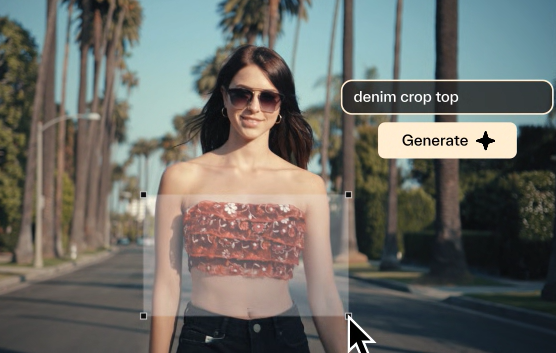
Screenshot archived from the listing page, for preview only.











