
Outline
AI collaborative document editorAI help inside every document you write
Highlights
What you can do with it
- Drafting blog posts, business reports, and academic papers
- Rewriting and polishing sections with AI commands
- Researching facts and gathering angles while you write
How to use it
- 1 Open Outline and start a new document or upload your draft
- 2 Use AI prompts to continue the text where you stopped
- 3 Highlight a passage to apply AI editing tools
- 4 Chat with the assistant for facts, research, or ideas
- 5 Start with the free trial, then pick a plan if it fits
Who it is for
Pros
- AI help is built directly into the editing surface
- Several ways to use AI: prompts, commands, highlights, chat
- Free trial available before any payment
Limitations
- Full use moves to a paid plan once the trial ends
- AI suggestions still need human fact-checking
- Cloud-based, so it needs a reliable internet connection
What Outline is
Outline is an AI-powered collaborative document editor built to help you get past writing hurdles and raise your output. It brings AI straight into the page: AI prompts continue your writing where you stopped, AI commands take care of specific tasks, and highlight tools put powerful editing options on any text you select. There is also a personal AI assistant you can chat with to check facts, run quick research, and generate creative content. Outline offers a free trial and simple pricing plans, so you can test the whole workflow before deciding whether a paid plan is worth it. It suits long-form work such as blog posts, business reports, and academic papers, and it works for teams that need to edit documents together.
What you can do with it
- Continue a draft with AI prompts when your ideas run dry
- Run AI commands to rewrite, expand, or restructure a section
- Highlight any passage to open AI editing tools
- Chat with the built-in assistant for facts, research, and new angles
Who it is for
- Writers and bloggers who want a second brain inside the editor
- Teams that co-edit documents and leave feedback in one place
- Students and professionals working on long reports or papers
What to watch out for
Outline is a trial-first product. The free trial lets you explore the tools, but continued use moves to a paid plan, and pricing can change over time. AI output is not guaranteed to be accurate, so verify important facts before you publish anything. Because it is a cloud-based editor, you need a stable internet connection, and it is worth checking how your documents are stored and handled before pasting sensitive material. The learning curve is mild but real: getting strong results from AI commands takes practice in how you phrase instructions, and the assistant works better when you give it clear context about what you are writing.
FAQ
Is Outline free to use?
Outline offers a free trial plus simple pricing plans, so you can try the editor and its AI features before deciding whether to pay.
What can the AI assistant do?
It can continue your writing, run commands on selected text, answer questions, and help with facts, research, and creative ideas.
Does Outline support teamwork?
Yes. Outline is a collaborative document editor, so several people can work in the same document instead of trading files.
Why it is free
What the official page says: free trial
Free limits, trial length and features are decided by the official site and can change at any time.
Product preview
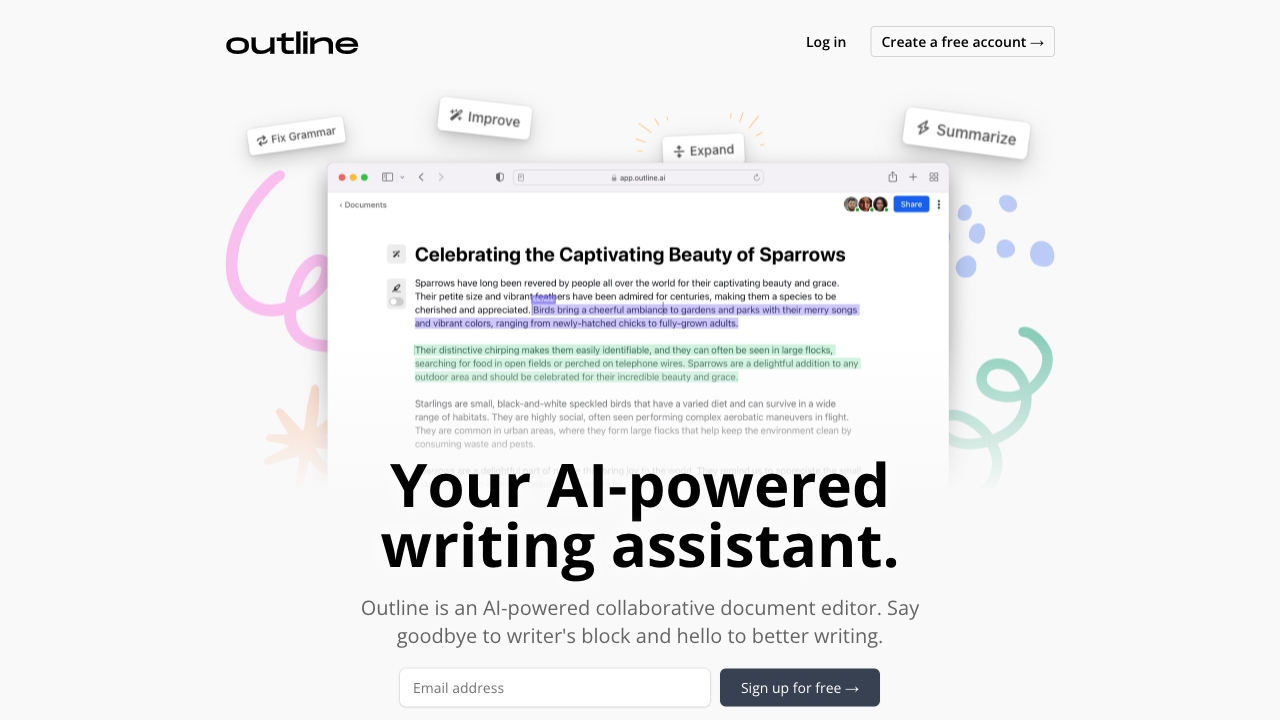
Screenshot archived from the listing page, for preview only.











