
Magicflow 2.0
AI productivity and time tracking assistantSee where your work hours go
Highlights
What you can do with it
- Find out when you actually do deep work
- Spot what interrupts your focus
- Review weekly productivity patterns
How to use it
- 1 Start the free trial at magicflow.com
- 2 Let the assistant track your activity
- 3 Review efficiency and focus data
- 4 Apply the personalized recommendations
Who it is for
Pros
- Free trial before paying
- Focuses on deep work, not just hours
- Reports make patterns visible
Limitations
- Automatic tracking needs broad activity access
- Paid version required for reports and auto tracking
- Tracking data is sensitive
- Trial terms and pricing can change
What Magicflow 2.0 is
Magicflow 2.0 is an AI assistant for productivity at magicflow.com. The site says it measures your work efficiency, tracks deep work and context switching, and helps you discover what keeps you productive and what disrupts your workflow. It also offers personalized recommendations aimed at making you more efficient. Listed features include efficiency measurement, deep work and context-switch tracking, personalized recommendations, automatic time tracking, weekly and monthly reports, and real-time productivity metrics, with the automatic tracking and reporting described as part of the paid version. A free trial is offered alongside that paid version.
What you can do with it
- Track deep work and context switching
- Measure efficiency over time
- Read weekly and monthly reports on paid plans
- Apply personalized recommendations to your routine
Who it is for
- Knowledge workers tracking their own focus
- Remote workers without office structure
- Anyone trying to build better work habits
What to watch out for
Automatic tracking requires broad access to your activity, which is sensitive, so read the privacy policy carefully and decide what you are comfortable sharing before installing anything. The free trial is limited, and the features that make the tool useful day to day, such as automatic tracking and reports, sit behind the paid version, so confirm current pricing on the official page before committing. Measurements are estimates: they can show patterns, but they cannot tell you whether the work you did was valuable, so use the data as one input alongside your own judgment. Because the service runs on external infrastructure, uptime and data handling are outside your control. Start with the trial, look at one week of data, and judge whether the insights change how you actually work before paying for the full version.
FAQ
Is Magicflow free?
It offers a free trial, and a paid version with automatic time tracking and reports.
What does it measure?
Work efficiency, deep work, and context switching, plus personalized recommendations.
What needs the paid version?
The site lists automatic time tracking, weekly and monthly reports, and real-time metrics as paid features.
What should I keep in mind?
Tracking requires access to your activity, so review the privacy policy, and pricing can change, so check the official page.
Why it is free
What the official page says: free trial
Free limits, trial length and features are decided by the official site and can change at any time.
Product preview
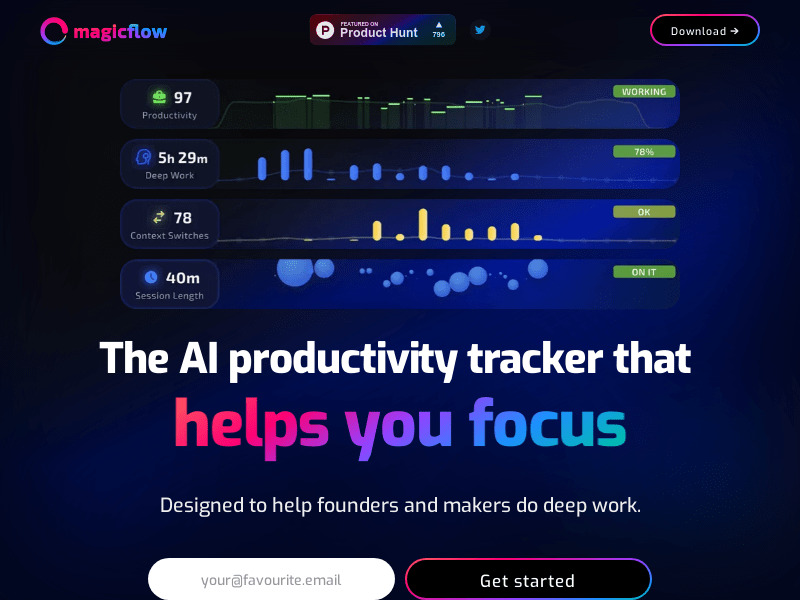
Screenshot archived from the listing page, for preview only.











