Delos Workers
AI workers that live in SlackSet a goal, the AI worker runs it
Highlights
What you can do with it
- A financial analyst worker builds monthly reports and flags a revenue trend
- A sales assistant worker follows up leads by email and answers incoming calls
- An administrative worker handles front desk inquiries and appointment scheduling
- A lean startup covers repetitive sales and finance work without new headcount
How to use it
- 1 Start the free trial by registering with your email
- 2 Pick a preset template from the All Workers list, such as sales or finance
- 3 Configure the worker's name, avatar, email, phone, and personality
- 4 Connect Slack, Teams, Gmail, CRM, and other tools and grant read and write access
- 5 Set the goal, for example 50 qualified leads per week, then deploy it to a channel
- 6 Review activity logs and adjust goals and permissions as you go
Who it is for
Pros
- Workers run around the clock without waiting for instructions
- Deployment is described as taking about five minutes
- Goal-based setup avoids writing step-by-step automation scripts
Limitations
- A free trial comes first, then a subscription, and pricing is not stated in the source
- Autonomous workers need supervision, especially early on
- Connecting 3,000+ tools means granting broad read and write permissions
- Workers acting under real identities raise disclosure questions you should settle internally
What Delos Workers is
Delos Workers is an autonomous AI employee platform. Rather than a single chat window, you get a set of workers with their own email addresses, phone numbers, and personalities, so they can act under a real identity when they contact customers or colleagues. There are 15 or more preset agents covering marketing, development, design, HR, and finance, and each arrives with its own skills and knowledge. The workers connect to Slack and Teams natively and to more than 3,000 tools including Gmail, Notion, HubSpot, Salesforce, Figma, and GitHub. Under the hood several large language models are used, including Claude, GPT, Gemini, Mistral, and Llama, with the system picking one per task. A free trial is offered and deployment is described as taking five minutes.
What you can do with it
- Deploy preset workers for sales, finance, service, or admin roles.
- Set a business goal and let the worker plan and execute without step-by-step prompts.
- Let workers read and write in CRM, email, analytics, and payment systems.
- Keep work running overnight, at weekends, and over holidays.
- Review activity logs and adjust goals and permissions as you learn.
Who it is for
- Startups with lean teams that need sales and finance work covered.
- Small and medium businesses wanting automation without a dev team.
- Sales and marketing teams that need consistent follow-up.
- Finance and admin departments handling reconciliation and monthly reporting.
What to watch out for
A free trial comes first and a subscription follows, but the source does not state pricing, so confirm the plans before you build a workflow around it. Autonomous workers need supervision, and the first weeks should include close review of what they send in your name. Connecting thousands of tools means granting broad read and write permissions, so scope access carefully. Workers acting under real identities also raise a disclosure question: decide internally whether customers and prospects should be told they are dealing with an AI. Trial terms can change, so check current limits before you commit.
FAQ
How is this different from a chatbot?
Each worker has its own email, phone number, and personality, and it plans and executes tasks on its own instead of waiting for prompts.
What tools does it connect to?
Slack and Teams natively, plus more than 3,000 tools including Gmail, Notion, HubSpot, Salesforce, Figma, and GitHub.
Which models power the workers?
The listing names Claude, GPT, Gemini, Mistral, and Llama, with the system choosing the model based on the task.
How long does setup take?
The source describes deployment as taking about five minutes, though connecting tools and setting goals will take longer in practice.
Why it is free
What the official page says: free trial
Free limits, trial length and features are decided by the official site and can change at any time.
Product preview
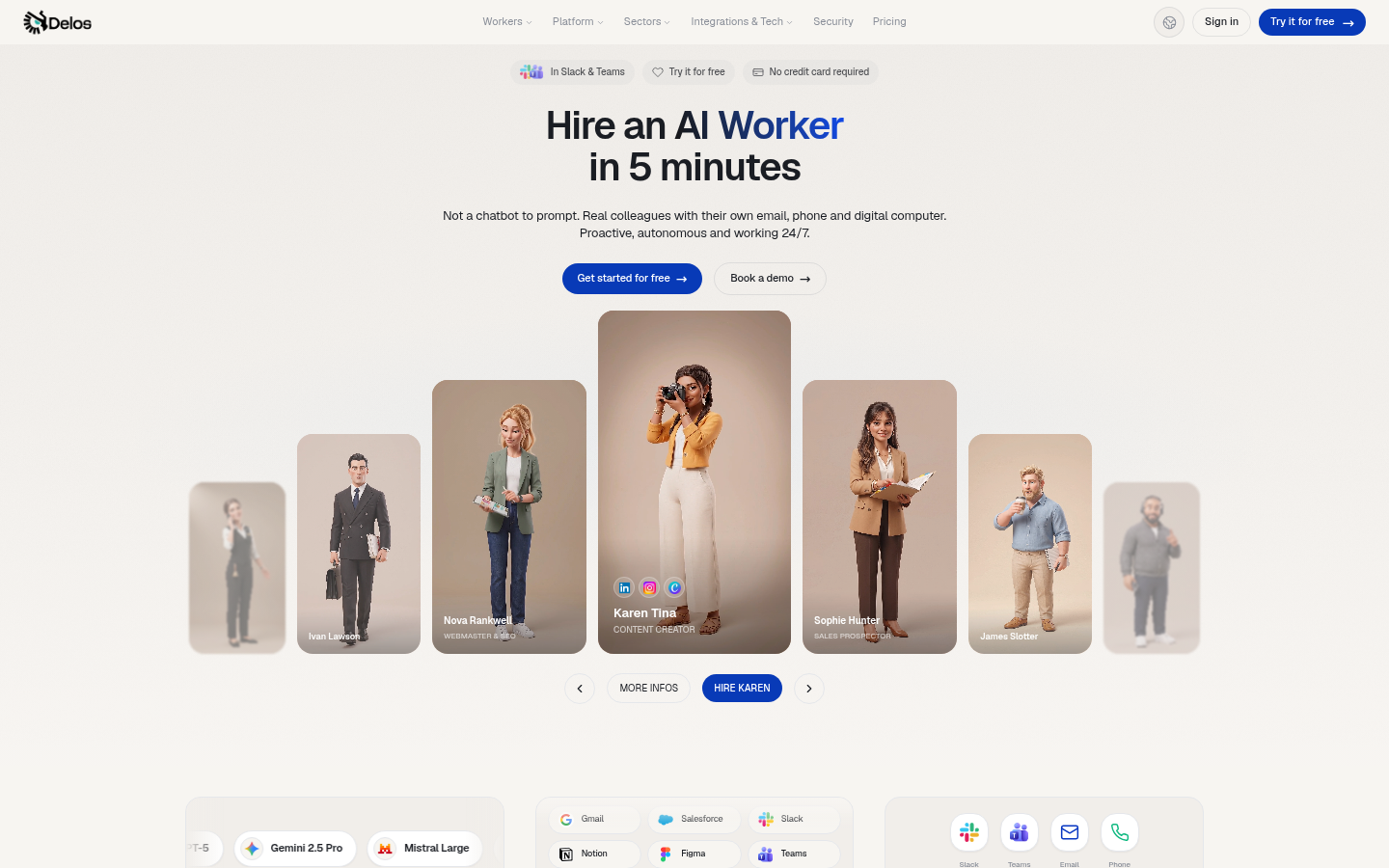
Screenshot archived from the listing page, for preview only.